Oman E-Invoicing Formats Explained: PINT-OM, UBL 2.1 and XML

Learn how XML, UBL and PINT-OM fit together in Oman e-invoicing. Understand invoice structure, validation rules and the technical details businesses should check.
Table of Contents
Introduction
When a business prepares for e-invoicing, one question often comes up: if the invoice is already in the system, why does its format matter?
The answer is that an e-invoice must be readable by software, not just by a person. The data needs to follow a defined structure and pass the rules that apply to Oman.
Three terms are central to this: XML, UBL and PINT-OM. They are connected, but each has a different job. XML is the structured file format, UBL provides the document structure, and PINT-OM defines the Oman-specific requirements within the Peppol framework.
This guide focuses on those technical differences, what they mean for invoice data and why an XML file can still fail validation.
Oman’s published technical documents cover three distinct processes:
- Standard invoices and credit notes: PINT-OM Billing defines the requirements for these documents.
- Self-billing invoices and credit notes: PINT-OM Self-Billing covers the process where the buyer issues the invoice on behalf of the supplier, subject to the applicable rules.
- Tax reporting to the OTA: The Tax Data Document (TDD) is a regulatory report submitted to the OTA, not an invoice exchanged between a supplier and buyer.
What format does Oman require for e-invoices? (Oman e-invoicing format)
The Oman Tax Authority (OTA) identifies XML as the mandatory structured format for e-invoices. Its Fawtara FAQ also states that a PDF invoice is not an e-invoice.
A PDF displays invoice information for people to read. A structured XML invoice arranges the information so that systems can process it according to a defined specification.
| Term | What it is | Its role in Oman e-invoicing |
|---|---|---|
| XML | A machine-readable file format that uses tags to organise data. | Carries invoice information in a structured digital form. |
| UBL | Universal Business Language, a standard model for business documents represented in XML. | Provides the document structure for invoice information, such as parties, lines, taxes and totals. |
| PINT-OM | Oman’s implementation of the Peppol International Invoice model. | Defines the invoice requirements and validation rules applicable to Oman. |
| Peppol | A framework for standardised exchange of electronic business documents. | Provides the technical approach used to exchange supported invoice documents between connected participants. |
These terms should not be used interchangeably. An XML file can still be incorrect, and a document that follows a general UBL structure may still fail Oman-specific PINT-OM rules.
Official references: OTA Fawtara FAQ PDF and OpenPeppol Oman specifications.
XML: the file format
XML stands for Extensible Markup Language. It stores information in named elements so that software can identify each value.
An invoice may contain an invoice number, issue date, supplier and buyer details, line items, tax amounts and a total payable. In XML, each value is placed in a defined element instead of being shown only as text on a page.
For example, an XML invoice might contain elements for:
- Invoice identification: The invoice number and issue date help identify the document and distinguish it from other invoices.
- Supplier and buyer: Party details identify who issued the invoice and who received it.
- Invoice lines: Product or service descriptions, quantities and prices explain what was supplied.
- Tax details: Tax categories, rates and amounts show how tax has been calculated.
- Totals: Line totals, tax totals and the amount payable show the financial result of the transaction.
These are examples of information categories, not a complete mandatory-field list. The exact fields and rules depend on the applicable Oman specification and document type.
Key point: XML is the required file format, but using XML alone does not make an invoice compliant. The file must also follow the expected structure and pass the relevant validation rules.
UBL: the structure of the invoice
UBL stands for Universal Business Language. It is a standard way to organise business documents such as invoices and credit notes.
Think of UBL as the layout plan for the data. It defines where information belongs and how different parts of the document are grouped. For example, supplier information is grouped separately from invoice lines and tax totals.
UBL helps different systems interpret invoice information consistently. Without a shared structure, each software provider could organise the same information in a different way, making automated exchange harder.
UBL 2.1 is the version of the UBL standard used as the syntax basis for Oman’s PINT-OM invoice documents. However, using UBL 2.1 alone does not make an invoice compliant. The document must also use the correct PINT-OM customization, field mappings, code lists and validation rules.
The official PINT-OM Billing syntax documentation shows how invoice data elements map to UBL elements, including invoice ID, issue date, currency, supplier and buyer details.
PINT-OM: Oman’s invoice rules
PINT stands for Peppol International Invoice. PINT-OM applies this model to standard electronic invoices issued in Oman.
PINT-OM is not a separate file format or file extension. A PINT-OM invoice is still an XML document. PINT-OM defines how that XML must be structured and which Oman-specific data and business rules it must satisfy.
PINT-OM helps determine:
- Which data elements are required: The specification identifies information that must be present for the relevant document. This helps teams map the right fields from their source system.
- How values should be represented: Rules define how certain values, identifiers and codes should appear. Following them helps systems interpret invoice data in the same way.
- How business rules are checked: Validation rules test whether the data meets the specification. They can identify missing information, invalid combinations or values that do not meet a rule.
- Which document process applies: Oman publishes separate specifications for billing, self-billing and the Tax Data Document. These documents serve different purposes, so businesses should confirm which process applies to their transactions.
OpenPeppol currently lists the following Oman specifications:
| Specification | Purpose |
|---|---|
| PINT OM Billing Process 1.0.1 | Defines the PINT-based requirements for standard invoices and credit notes issued in Oman. |
| PINT OM Self-Billing Process 1.0.1 | Covers self-billing, where the buyer issues the invoice on behalf of the supplier, subject to the relevant process rules. |
| Oman Tax Data Document (TDD) Process 1.0.1 | Defines a regulatory tax report submitted to the OTA. It is not an invoice exchanged between the supplier and buyer. |
The versions below were listed on the official OpenPeppol Oman specifications page on the date of publication. Check the live documentation before implementing or updating a solution, as technical specifications can change.
Source: OpenPeppol Oman specifications.
How the three fit together
XML, UBL and PINT-OM work at different levels of the same invoice.
| Layer | Example | What it controls |
|---|---|---|
| File format | XML | How the data is stored in a machine-readable file. |
| Document structure | UBL syntax | Where invoice information is placed in the document. |
| Oman-specific requirements | PINT-OM | Which data and business rules apply to the invoice. |
| Validation | PINT-OM rules and schematrons | Whether the invoice meets the specified structural and business checks. |
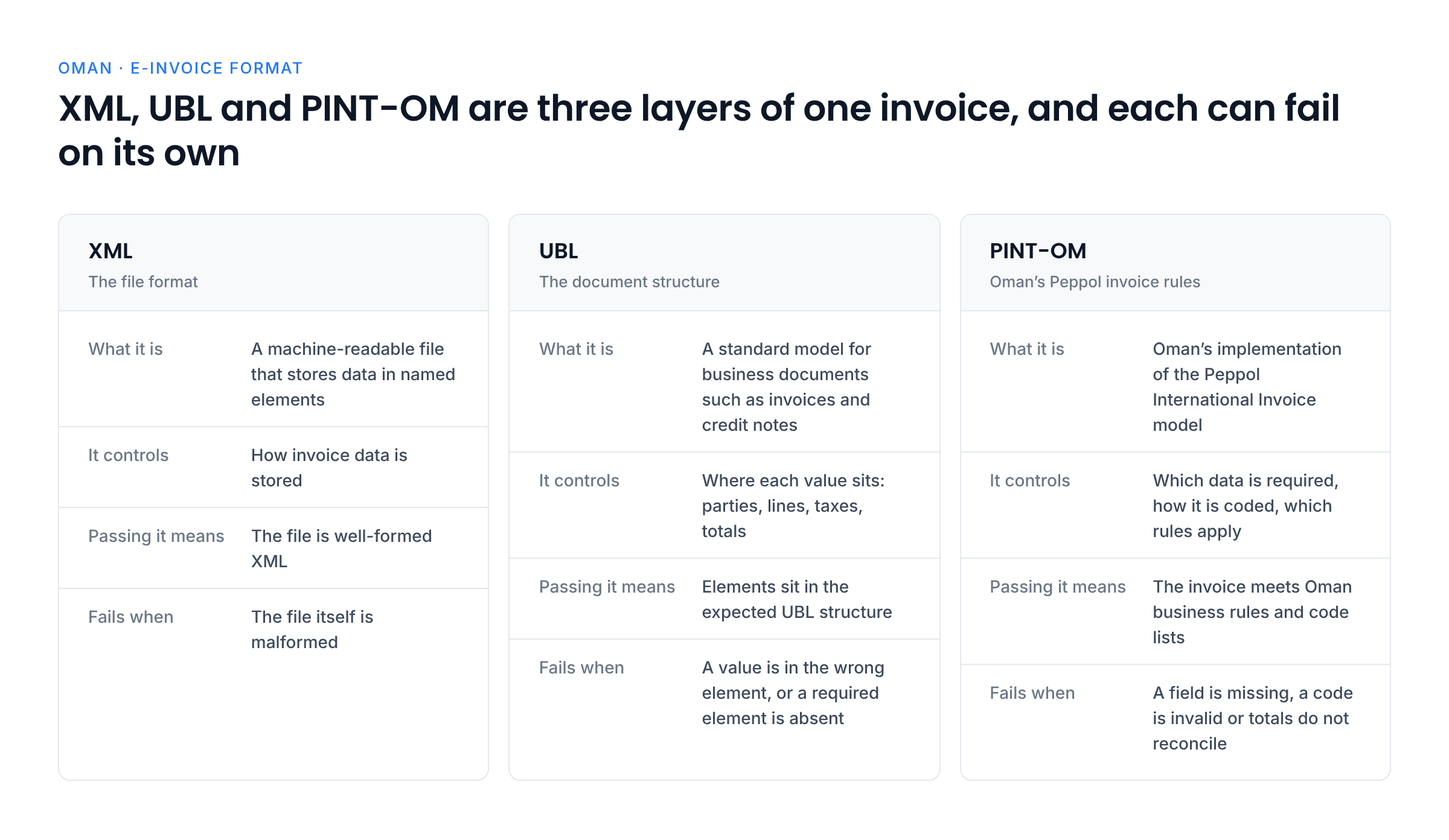
Consider an invoice that contains the right information but places a value in the wrong XML element. The file may be valid XML, but it may not match the expected UBL structure. It can therefore fail validation.
Likewise, an invoice may follow the expected structure but contain an invalid tax code or omit a required field. It may still fail PINT-OM validation.
Compliance depends on the complete specification, not just the file extension or document appearance.
Why can an XML invoice fail validation?
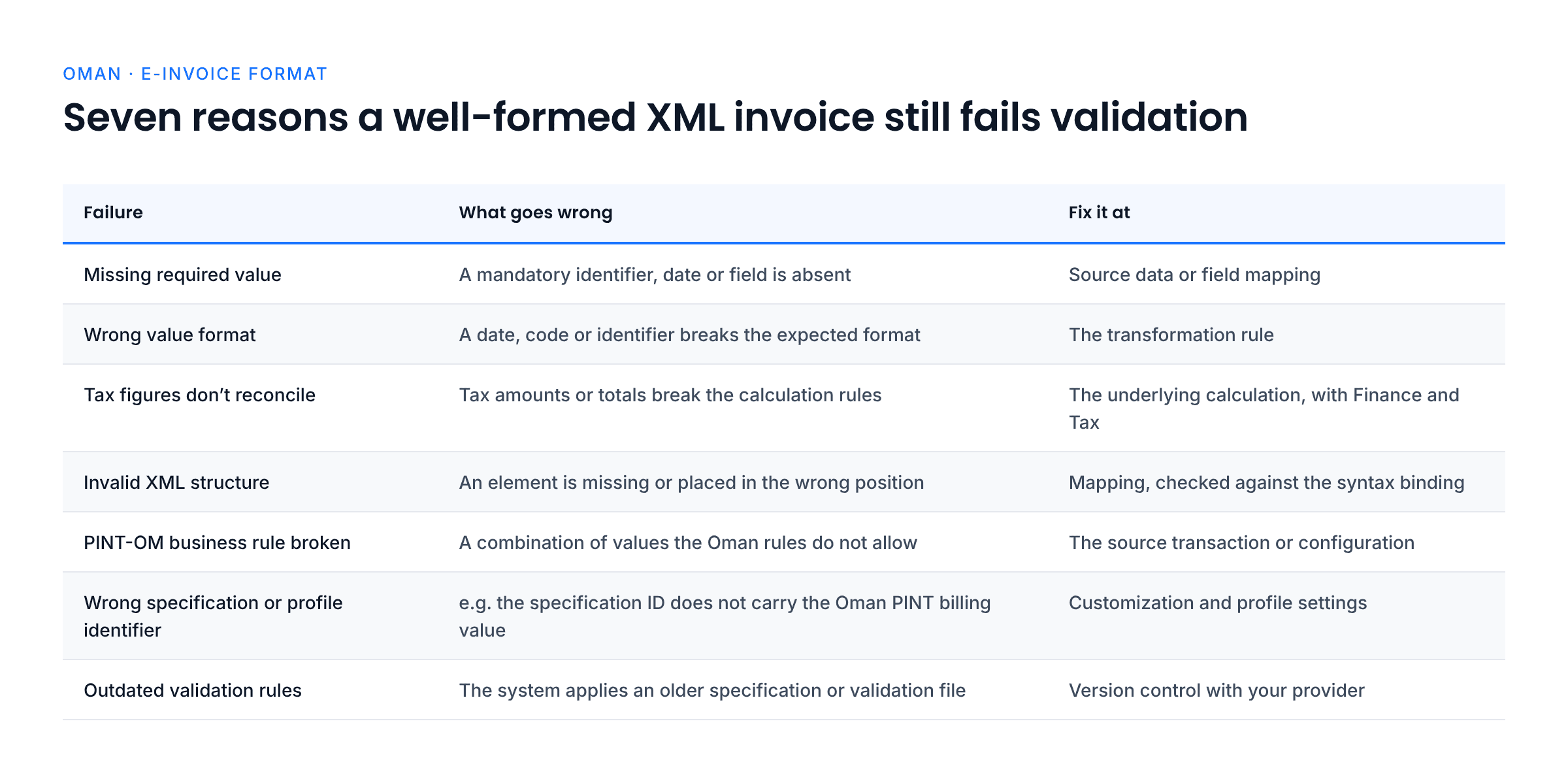
Validation errors usually point to a problem with the data, its structure or the rule set being used. Common examples include:
- A required value is missing: An invoice may not contain a mandatory identifier or date. The source data or mapping needs to be corrected so the required value is supplied.
- A value uses the wrong format: A date, code or identifier may not follow the expected format. Correcting the transformation rule can prevent the same error from recurring.
- Tax figures do not reconcile: A tax amount or total may not match the applicable calculation rules. Finance or Tax should review the underlying calculation, not simply edit the output file.
- The XML structure is incorrect: A field may be placed in the wrong element or a required element may be absent. The mapping should be checked against the official syntax documentation.
- A business rule is not met: The invoice may contain a combination of values that the PINT-OM rules do not allow. The team should review the specific validation message and correct the source transaction or configuration.
- Customization or profile identifiers are incorrect: The invoice may contain the wrong specification identifier, profile value or document type. These values tell receiving systems and validation tools which rules apply.
- The solution uses outdated rules: A system may still apply an older specification or validation file. The provider and technical team should confirm that the implementation uses the applicable current version.
A useful error-handling process records the validation message, identifies the source of the incorrect value, corrects it and retests the invoice. Repeatedly changing the generated XML without fixing the source data can cause the same problem to return.
What should technical teams check?
The technical review should focus on mapping, validation and version control rather than general rollout planning.
- Source-to-target mapping: Confirm how each field in the ERP or billing system maps to the required XML element. This makes it easier to trace an error back to the field that produced it.
- Mandatory and conditional fields: Identify which fields are always required and which apply only to certain transactions. This avoids treating every field as mandatory or overlooking a field that becomes necessary in a specific case.
- Code lists and identifiers: Check that codes and identification schemes match the specification. A value that looks reasonable to a person may still be rejected if it uses an unsupported code.
- Calculation consistency: Test line amounts, tax totals and payable amounts against the applicable rules. This helps catch differences between the source system and the generated invoice.
- Specification version: Record which PINT-OM version and validation artefacts are in use. This gives the team a clear baseline when rules are updated.
- Regression testing: Retest representative invoice scenarios after changing mappings or validation rules. This helps confirm that a fix for one error has not introduced another.
For technical implementation, use the official PINT-OM Billing specification and the OTA’s e-invoicing manuals. The detailed specification should take precedence over a generic invoice template or an old sample file.
What should businesses ask their solution provider?
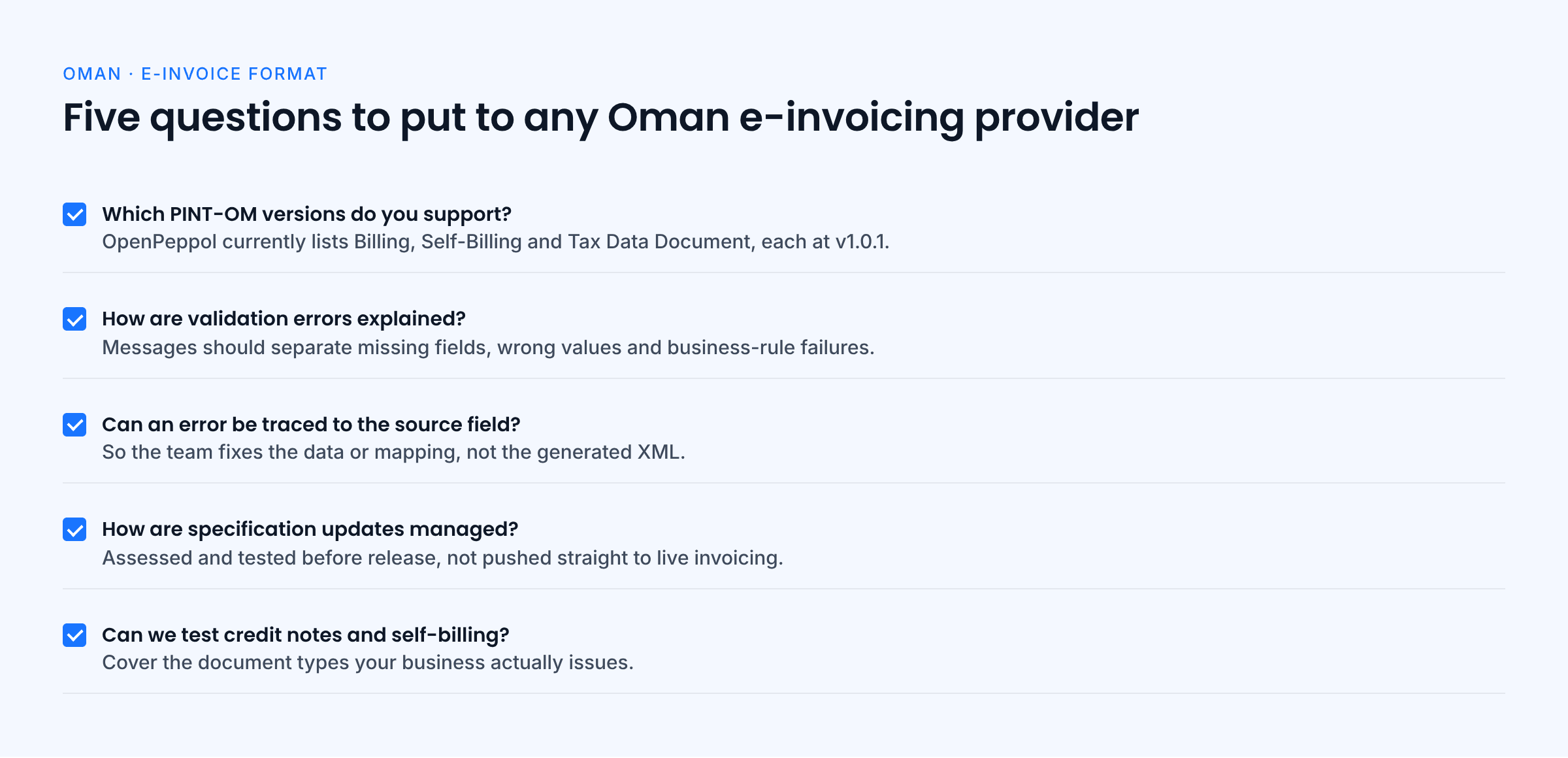
A provider should be able to explain how its solution handles Oman’s technical specifications and how the business can investigate invoice errors.
- Which exact PINT-OM versions and validation artefacts do you support? Ask which versions you support for Billing, Self-Billing and TDD, and which validation artefacts you apply. This helps confirm that the solution covers the document processes your business needs.
- How do you explain validation errors? Clear messages help technical and finance teams understand whether the issue is a missing field, incorrect value or business-rule failure.
- Can we trace an error to the source field? Traceability helps the team fix the underlying data or mapping instead of repeatedly editing generated files.
- How are specification updates managed? Ask how updates are assessed and tested before release so that technical changes do not unexpectedly disrupt invoice processing.
- Can we test credit notes and self-billing where relevant? Testing the document types your business uses helps confirm that the solution supports more than a standard invoice.
Businesses should select a provider accredited by the OTA. accredited service providers like Complyance (check the OTA’s official accredited provider list) can support the e-invoicing connection, but businesses should confirm current accreditation and the specific Oman formats supported before selecting a solution.
Final thoughts
For Oman e-invoicing, XML, UBL and PINT-OM are connected but not interchangeable. XML carries the data, UBL structures it, and PINT-OM defines the Oman-specific requirements the invoice must meet.
For technical teams, the main task is to map source data correctly, apply the right specification and test the invoice against the current validation rules. A file that opens successfully is not necessarily a compliant e-invoice.
Use the official OTA and OpenPeppol documentation as the reference point for implementation. This helps keep invoice mappings aligned with the published requirements as specifications evolve. Because Fawtara implementation is phased, businesses should align technical testing with their applicable compliance date.
Official sources
- Oman Tax Authority: Fawtara FAQ PDF
- Oman Tax Authority: E-invoicing manuals
- OpenPeppol: Oman specifications
- OpenPeppol: PINT-OM Billing
- OpenPeppol: PINT-OM Billing syntax
- Oman Tax Authority: Accredited service providers
Editorial note: This article is general information, not legal or tax advice. Check the live OTA and OpenPeppol documentation for the applicable technical version before implementation.
Frequently Asked Questions
Yes. The OTA’s Fawtara FAQ identifies XML as the mandatory structured format. The invoice must also follow the applicable structure and Oman validation rules.
No. The OTA FAQ states that a PDF invoice is not an e-invoice. A PDF is designed for people to read, while the required XML file carries structured data that systems can process.
UBL provides the document structure used to organise invoice information. PINT-OM applies Oman-specific requirements to that invoice, including the relevant data rules and validation checks.
No. The XML must also follow the expected UBL syntax and meet the applicable PINT-OM rules. Missing fields, incorrect codes or invalid calculations can still cause an invoice to fail.
They use related specifications but serve different processes. OpenPeppol publishes separate PINT-OM Billing and PINT-OM Self-Billing specifications, so businesses should use the one that matches the transaction.
Start with the OpenPeppol Oman specifications page, which lists the published billing, self-billing and Tax Data Document specifications. The OTA’s e-invoicing manuals provide additional official implementation guidance.
About the Author

Swathy
Content Marketer
I’m a Content Marketer at Complyance, focused on e-invoicing. Over the years, I’ve created a wide range of content, including blog posts, whitepapers, and product guides, which have supported Complyance’s growth across markets such as the UAE and EU regions. My goal is to deliver content that is comprehensive, clear, accurate, and easy to understand, no matter how complex the topic.