Oman E-Invoicing Readiness: The Complete Preparation Guide for Businesses

Prepare for Oman's Fawtara e-invoicing system with practical steps for ERP readiness, invoice data, service-provider selection, team responsibilities, testing and ongoing compliance.
Table of Contents
Introduction: Preparing for Oman E-Invoicing
Oman's Fawtara e-invoicing system will change how businesses create, exchange and report invoices. Preparation is not limited to installing software or selecting a service provider. Businesses also need to review invoice data, assess their ERP and accounting systems, understand the applicable technical requirements, prepare internal teams and establish processes for handling errors.
This guide brings those activities together into one practical preparation plan for Finance, Tax, IT, Product and Operations teams. It is intended to help businesses identify gaps early and plan the work needed before implementation.
E-invoicing requirements and rollout details should always be checked against the latest Oman Tax Authority (OTA) guidance. Businesses can start with the OTA's official e-invoicing resources, taxpayer guidance and potential rollout checker.
What Does Oman E-Invoicing Mean for Businesses?
Under Fawtara, businesses need to prepare for structured electronic invoicing rather than treating a PDF or printed invoice as the complete electronic invoice. The OTA's guidance identifies XML as the required structured format, with the applicable Oman specifications defining how invoice information must be represented.
For businesses, this means the information stored in an ERP, accounting platform or billing application must be accurate and capable of being mapped to the required structured invoice. The invoice also needs to pass the relevant validation rules and follow the applicable exchange and reporting process.
The exact workflow can vary by transaction type. For example, the route for a transaction involving a VAT-registered business may differ from the route used for certain consumer transactions. Businesses should therefore map their own transaction types and confirm the applicable process in current OTA guidance rather than assuming every invoice follows an identical path.
Why Businesses Should Start Preparing Early
E-invoicing readiness involves several connected workstreams. Delaying one can affect the others.
- IT and ERP teams need time to assess integration gaps. Existing systems may need mapping changes, interfaces, status handling or new exception workflows.
- Finance and Tax need to validate invoice logic. Tax treatment, totals, credit notes and other transaction scenarios must be reviewed before testing.
- Master data may need cleanup. Incomplete buyer or supplier records can cause avoidable validation and reconciliation problems.
- Provider selection takes preparation. Businesses need to understand integration options, support arrangements, testing facilities and how the provider handles updates.
- Testing needs real business scenarios. A basic successful invoice is not enough to prove that the wider process is ready.
- Teams need clear operating procedures. Staff should know how to monitor submissions, investigate errors and correct source data.
Starting early gives each team time to identify problems, assign ownership and resolve issues before the implementation deadline.
Six Steps to Prepare for Oman E-Invoicing
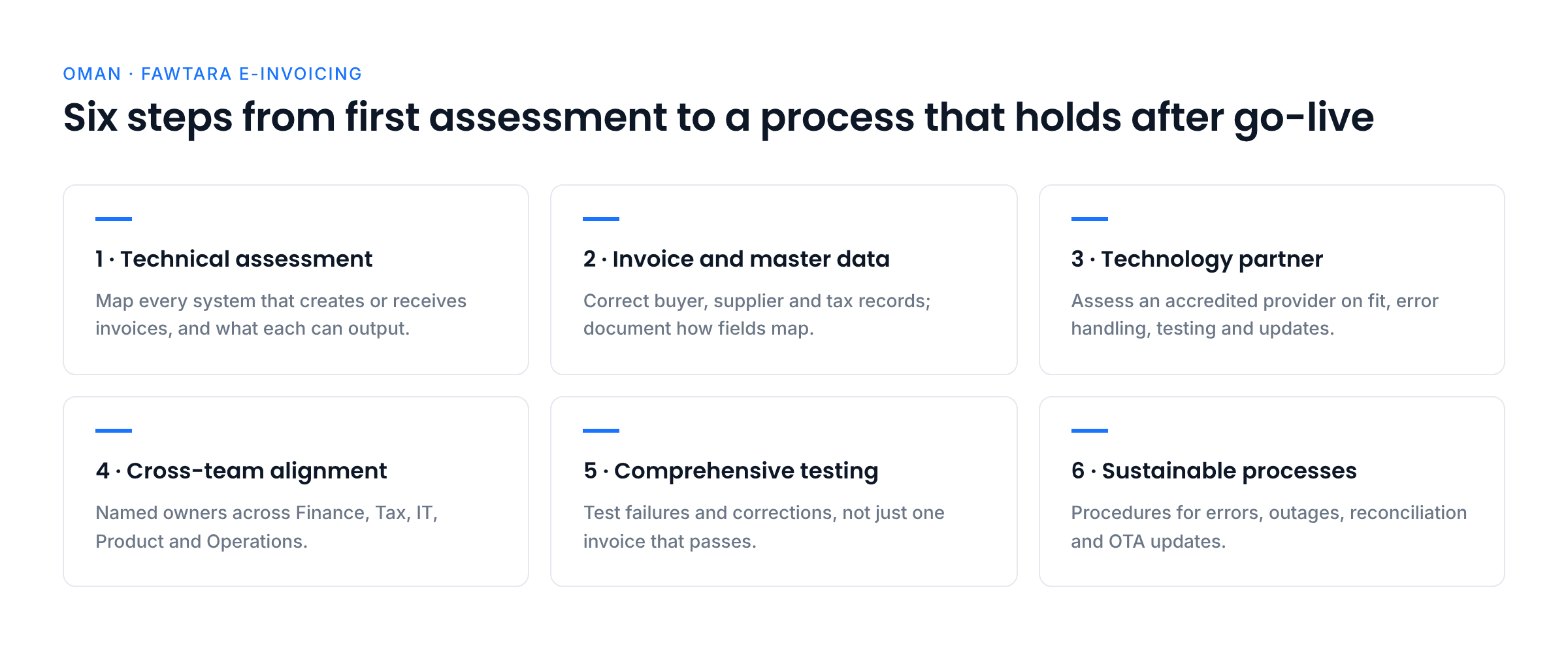
1. Conduct a Technical Assessment
Start by reviewing the systems that create, approve, store and process invoices. Identify which ERP, accounting, billing, point-of-sale or custom applications are involved, and understand how invoice information moves between them.
Do not assume that a system is ready simply because it can generate a PDF invoice. The assessment should establish whether the system can provide the required structured data, support the applicable Oman specifications and exchange information with the selected service provider.
What to check:
- List all systems that create or receive invoices.
- Identify how invoice data is exported or shared between systems.
- Check whether the system can provide the fields required for the applicable Oman invoice type.
- Review support for invoices, credit notes and other relevant transaction scenarios.
- Identify integration, mapping, validation and status-tracking gaps.
- Document the changes needed and assign an owner to each gap.
Expected outcome: A technical gap assessment showing what can be reused, what needs configuration or development, and what requires further confirmation with the provider.
2. Streamline Invoice and Master Data
Structured e-invoicing depends on accurate source data. Incomplete customer details, inconsistent supplier records, incorrect tax classifications or missing invoice references can create problems before an invoice reaches the validation stage.
Review the source of each important invoice field instead of checking only the final invoice layout. Where the same information appears in several systems, decide which system is authoritative and how changes will be kept consistent.
What to check:
- Review buyer and supplier names, identifiers, addresses and other applicable details.
- Confirm VAT registration information and tax treatment with the Tax team.
- Check product or service descriptions, quantities, units, prices and tax categories.
- Review invoice numbering, dates, totals and references to original invoices where applicable.
- Identify duplicate, outdated or incomplete records.
- Define who can create and amend master data and who approves changes.
- Document how source fields map to the required structured invoice.
Expected outcome: A data-quality plan with clear ownership, corrected high-priority records and documented field mappings.
3. Choose an Adaptive Technology Partner
A service provider can play an important role in connecting a business's systems to the Fawtara process. Selection should be based on more than the initial connection or price. Businesses should understand how the provider supports applicable Oman requirements, validates invoice data, handles errors and responds when technical specifications change.
Review the OTA's official accredited service provider list and confirm the provider's current status and scope before making a decision. Businesses evaluating accredited service providers like Complyance should assess the provider against their own systems, transaction volumes, support needs and implementation plan.
Questions to ask potential providers:
- How will our ERP or billing system connect to the platform?
- Which data formats, APIs or other integration methods are supported?
- How are invoice validation results and rejection reasons returned?
- How are specification changes communicated and implemented?
- What testing environment and implementation support are available?
- How are security, access controls, audit logs and data retention handled?
- How are outages, delayed responses and failed submissions managed?
- What monitoring and support are available after go-live?
Expected outcome: A documented provider assessment that covers technical fit, compliance support, security, service levels and long-term maintenance.
4. Foster Cross-Team Alignment
E-invoicing affects more than one department. Finance understands how invoices are calculated and reconciled. Tax interprets the rules. IT manages integrations and system reliability. Product teams may need to change billing logic, while Operations and customer-facing teams need to understand changes to everyday workflows.
Assign clear responsibilities before implementation begins.
- Finance: Review calculations, totals, discounts, credit notes, reconciliation and the handling of invoice statuses.
- Tax: Interpret OTA guidance, confirm tax treatment and help define the rules that systems must apply.
- IT and ERP: Manage interfaces, data mapping, access, monitoring, error handling and technical changes.
- Product: Review changes needed in billing products, customer workflows and transaction scenarios.
- Operations and customer service: Understand how to respond to invoice issues and communicate with customers or suppliers.
- Management and project owners: Approve priorities, resolve dependencies and track readiness.
Expected outcome: A responsibility matrix, an agreed project plan and a regular process for resolving cross-team questions.
5. Implement Comprehensive Testing
Testing should cover the complete invoice process, not only whether one invoice can be created. Work with the selected provider to confirm the available testing arrangements and test the scenarios relevant to your business.
Include both successful and unsuccessful cases. Test how errors are reported, who investigates them and whether corrections can be made without losing the audit trail.
What to test:
- Standard invoices and the relevant credit-note or adjustment scenarios.
- Required and conditional fields for the applicable invoice types.
- Missing, invalid or inconsistent data.
- Tax calculations, totals, rounding and currency handling.
- Mapping from the source ERP or billing system to the structured invoice.
- Submission statuses, rejection messages and correction workflows.
- Duplicate submissions, timeouts, retry behaviour and connectivity failures where supported.
- Reconciliation between source-system records and provider responses.
- User permissions, audit logs and access to invoice records.
Record the results, fix the underlying causes and repeat tests after material changes. Confirm with the provider which test cases and acceptance criteria apply to the implementation.
Expected outcome: Documented test results, resolved high-priority defects and sign-off from the teams responsible for the relevant workflows.
6. Establish Sustainable Processes
Readiness does not end when the connection is live. Businesses need a repeatable process for creating invoices, monitoring statuses, resolving exceptions and keeping systems aligned with current requirements.
Create practical procedures that staff can follow during normal operations and when something goes wrong.
Define procedures for:
- Creating and issuing invoices through the approved workflow.
- Reviewing validation errors and correcting source data.
- Assigning rejected or unresolved invoices to the right team.
- Handling provider or connectivity interruptions.
- Monitoring pending, failed and successfully processed documents.
- Reconciling invoice records and retaining supporting evidence.
- Reporting technical issues and escalating unresolved problems.
- Reviewing OTA updates and assessing whether system changes are required.
- Training new employees and updating internal guidance.
Expected outcome: Documented operating procedures, named process owners and a plan for ongoing monitoring and change management.
How to Prepare Your ERP for Oman E-Invoicing
Your ERP or billing system is usually where invoice data begins. If that data is incomplete, inconsistent or difficult to extract, the service provider may not be able to produce a compliant structured invoice without additional mapping or correction.
The objective is not necessarily to replace your ERP. It is to understand what the system can already do, identify the gaps and decide how it will work with the chosen service provider and the applicable Oman requirements.
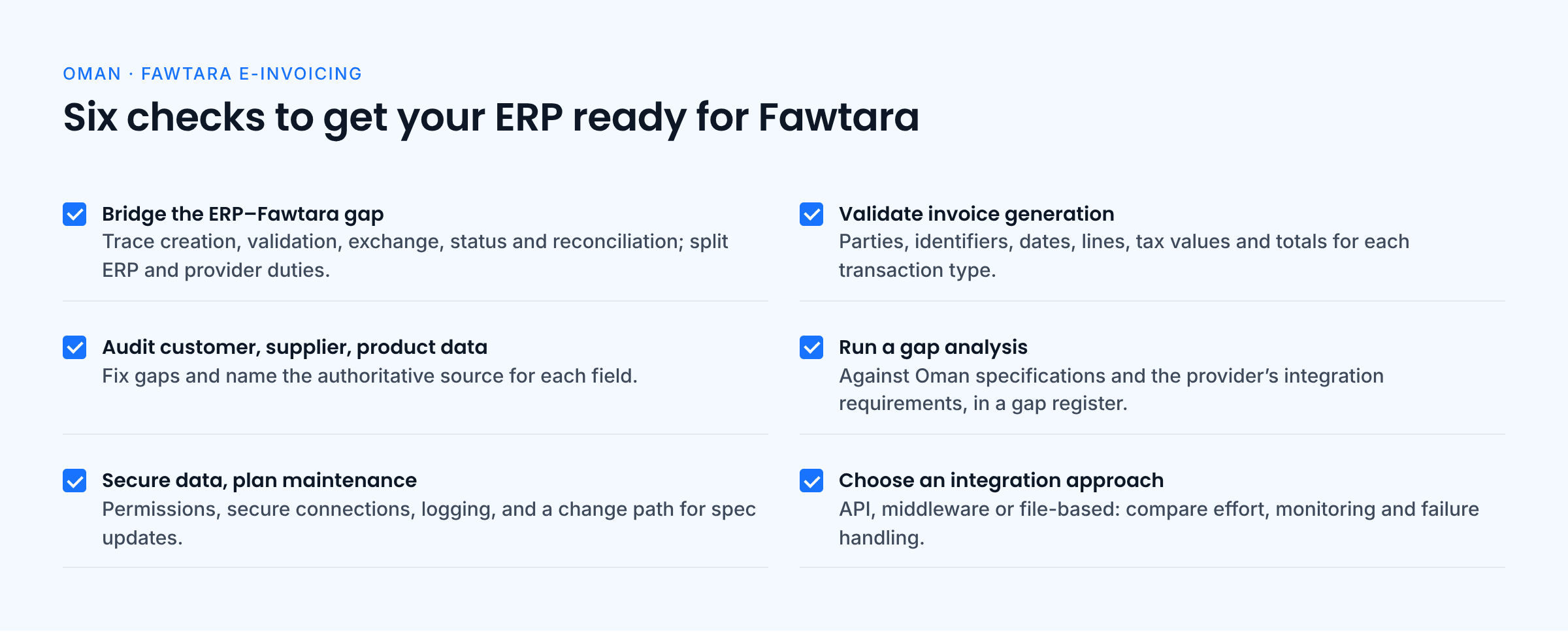
Bridge the Gap Between Your ERP and Fawtara
Systems such as SAP, Oracle, Microsoft Dynamics, NetSuite and other accounting or billing applications may require configuration or integration work to support a new e-invoicing process. The exact work depends on the system, existing data and selected integration approach.
Review the entire flow from invoice creation through validation, exchange, status updates and reconciliation. Confirm which steps are handled by your own systems and which are handled by the service provider.
Validate Invoice Generation Capabilities
Check whether your ERP can provide the invoice information required for each relevant transaction type. Confirm that the system can represent key details such as supplier and buyer information, invoice identifiers, dates, line items, tax values, totals and references where applicable.
Do not assume every field is mandatory for every invoice. Use the current OTA guidance and applicable Oman technical specifications to distinguish mandatory, conditional and optional information.
Audit Customer, Supplier and Product Data
Review the master data that feeds invoice creation. Correct missing or inconsistent details and define how new records will be checked before use. If different systems store conflicting values, identify the authoritative source and establish a process for synchronising updates.
Conduct a Gap Analysis Against Oman Requirements
Compare the data your ERP produces with the applicable Oman specifications and the integration requirements of your selected provider. Review structured output, field mapping, validation feedback, transaction coverage and the way invoice statuses are returned to the source system.
Keep a gap register that records the issue, business impact, owner, planned fix and test required to confirm the fix.
Secure Data and Plan for Long-Term Maintenance
E-invoicing moves financial information between systems, so security and access controls should be part of the design. Review user permissions, secure connections, logging, monitoring and the handling of invoice records.
Also define how changes to OTA guidance or technical specifications will be reviewed, approved, tested and deployed. This helps prevent the integration from becoming difficult to maintain after go-live.
Decide on an Integration Approach
Assess the options available for connecting your ERP to the service provider. Depending on your architecture, the solution may use an API, middleware, a file-based interface or another supported method. Confirm the available options directly with the provider.
Compare each option for implementation effort, monitoring, error handling, scalability and maintenance. Document how the integration will respond when a submission fails or a system becomes unavailable.
How Every Team in Your Company Should Prepare
A clear division of responsibilities helps avoid delays and uncertainty during implementation.
Finance Teams
Finance should verify how invoices are calculated and how adjustments are handled. Review discounts, rounding, totals, credit notes and reconciliation procedures. Finance should also help validate customer and supplier records and define how the team will review document statuses and resolve discrepancies after go-live.
IT and ERP Teams
IT should assess the current systems, build or configure the required integration and make sure invoice data and statuses move reliably between systems. The team should plan for monitoring, access controls, error logging, retries and system changes without disrupting wider business operations.
Product Teams
Where a product or platform generates invoices, the product team should review whether billing logic and customer workflows need to change. Consider refunds, adjustments, invoice corrections and other scenarios relevant to the product. Build flexibility into the solution so that future specification updates can be assessed and implemented in a controlled way.
Tax Professionals
Tax teams should interpret current OTA guidance and translate it into clear requirements for Finance, IT and Product. They should confirm the tax treatment of relevant transactions, review the applicable invoice rules and help approve test scenarios. They should also monitor official updates and assess whether a change affects processes or systems.
Operations and Customer Service
Operations and customer-facing teams should understand what changes in invoice delivery and how to respond when a document is delayed, rejected or needs correction. Provide clear escalation routes so that customer questions can be resolved without losing track of the underlying invoice issue.
A Seven-Step Roadmap for Tax Teams
Tax teams play a central role in making sure the business requirements are understood and implemented consistently. The following roadmap can help organise their work.
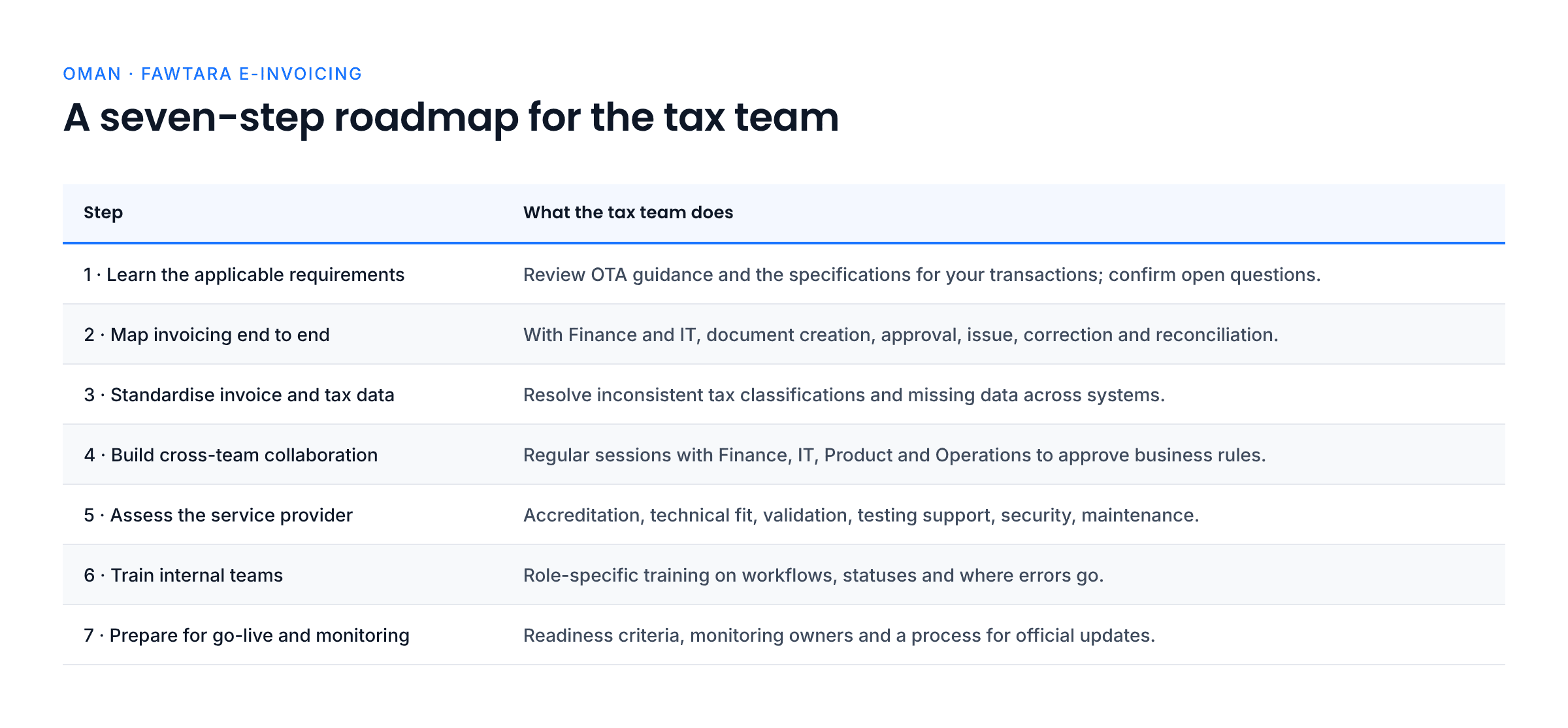
1. Learn the Applicable Oman Requirements
Review the latest OTA taxpayer guidance and the technical specifications relevant to the business's transactions. Identify which invoice information and processes need to be considered, and confirm uncertainties through official guidance or the selected provider.
2. Map the Invoicing Process End to End
Work with Finance and IT to document how invoices are created, approved, issued, exchanged, corrected and reconciled. Identify the systems involved, where each field originates and who owns it.
3. Standardise Invoice and Tax Data
Review how customer, supplier, product, service and tax information is recorded. Resolve inconsistent tax classifications and missing data, and define standards for maintaining records across systems.
4. Build Cross-Team Collaboration
Set up regular working sessions with Finance, IT, Product and Operations. Use them to review open questions, track gaps, approve business rules and resolve dependencies before testing.
5. Assess the Service Provider
Help evaluate the provider's current accreditation status, technical fit, validation approach, testing support, security controls and ongoing maintenance arrangements. Confirm that the proposed solution supports the business's transaction profile.
6. Train Internal Teams
Prepare role-specific training so employees know the new workflows, how to interpret statuses and where to send errors for resolution. Keep instructions practical and update them when systems or requirements change.
7. Prepare for Go-Live and Monitoring
Agree on readiness criteria before go-live. Define who monitors invoice statuses, reviews exceptions, reconciles records and escalates incidents. Establish a process to review official updates and determine whether changes to the implementation are needed.
Final Readiness Checklist
Use this summary to track the main preparation activities.
- Confirm the applicable rollout phase using current OTA resources.
- Document legal entities, VAT registrations and relevant transaction types.
- Complete a technical assessment of ERP, billing and accounting systems.
- Review and correct customer, supplier, product and tax data.
- Map source-system fields to the applicable structured invoice requirements.
- Evaluate service providers and confirm current accreditation status.
- Assign responsibilities across Finance, Tax, IT, Product and Operations.
- Document integration requirements and exception-handling workflows.
- Test relevant invoice types, validation errors and correction processes.
- Train employees on the workflows they will use.
- Establish monitoring, reconciliation, record-keeping and escalation procedures.
- Create a process for reviewing official updates and maintaining the integration.
Conclusion: Make E-Invoicing Readiness a Business-Wide Effort
Preparing for Oman e-invoicing is a coordinated business task. Accurate data, an appropriately configured ERP, a suitable service provider and clear team responsibilities all contribute to a more reliable implementation.
Start by confirming the requirements that apply to your business, then assess systems and data before moving into integration and testing. Give each team clear ownership and establish procedures for monitoring invoices and resolving issues after go-live.
Most importantly, keep your implementation plan connected to current OTA guidance. Use official resources to confirm rollout details and technical requirements, and work with your selected provider to validate the approach for your systems and transactions.
Official Resources
Frequently Asked Questions
Start by confirming the applicable rollout information and mapping the systems and transaction types involved. Then assess invoice data, ERP capabilities, integration requirements and internal responsibilities.
A PDF alone is not a substitute for the required structured e-invoice. The OTA's guidance identifies XML as the mandatory structured format. Check the current technical guidance for the applicable requirements.
Not necessarily. The first step is to assess whether the current ERP or billing system can provide the required data and connect to the selected provider. The changes needed depend on the system and the business's transaction profile.
Finance, Tax, IT and ERP teams should be involved at a minimum. Product, Operations, Procurement and customer-facing teams may also need to participate depending on how the business creates and processes invoices.
Review the OTA's official accredited service provider list and assess the provider's technical fit, integration options, validation and error handling, testing support, security, service levels and ongoing maintenance.
Use the OTA's latest official guidance and potential rollout checker. Because rollout information can be updated, avoid relying solely on older articles or summaries.
About the Author

Swathy
Content Marketer
I’m a Content Marketer at Complyance, focused on e-invoicing. Over the years, I’ve created a wide range of content, including blog posts, whitepapers, and product guides, which have supported Complyance’s growth across markets such as the UAE and EU regions. My goal is to deliver content that is comprehensive, clear, accurate, and easy to understand, no matter how complex the topic.