Oman E-Invoicing: 6 Biggest Pitfalls Businesses Should Avoid

Avoid common Oman e-invoicing mistakes. Learn how to prepare for Fawtara, choose an accredited provider, integrate your systems, train teams and maintain compliance.
Table of Contents
The 6 Biggest Pitfalls to Avoid in Your Oman E-Invoicing Implementation
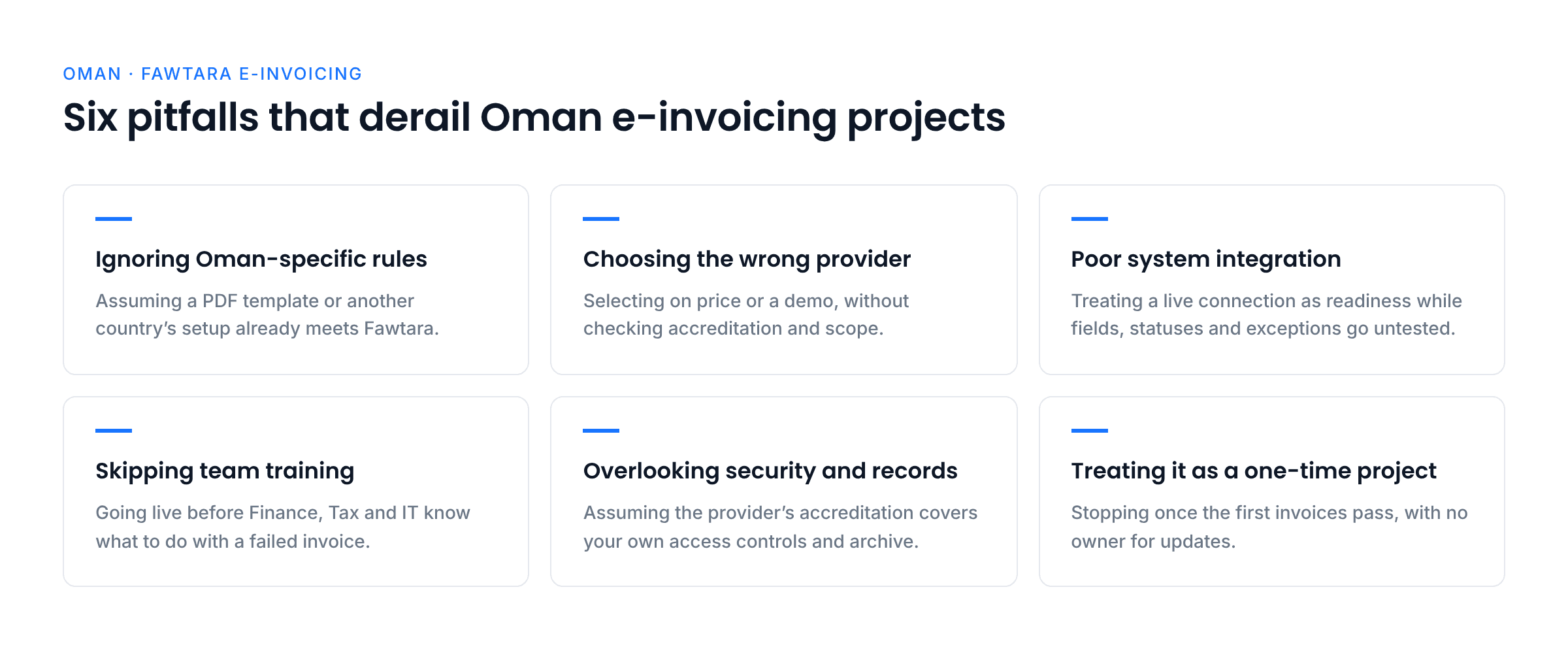
A business can be nearly ready for e-invoicing and still have gaps that affect the whole process. An invoice may look correct on screen, but its structured data could be incomplete. An ERP may work well for ordinary sales but fail to handle a transaction that needs a different workflow. A provider may validate the invoice, but the business still needs to ensure that the underlying transaction and tax details are accurate.
Oman’s Fawtara system introduces requirements that businesses need to build into their invoice processes, systems and daily operations. Assuming that a standard PDF invoice or an existing accounting workflow will be enough can leave important gaps.
Poor preparation can lead to rejected or delayed invoices, manual rework, reconciliation issues and difficulty demonstrating compliance. The aim is not simply to connect to a service provider. It is to establish a process that produces accurate structured invoices, handles exceptions and keeps records accessible.
The good news is that many implementation problems can be identified before go-live. Here are six pitfalls to address when preparing your business for Oman e-invoicing.
1. Ignoring Oman’s Specific E-Invoicing Requirements
It is easy to assume that e-invoicing works the same way in every country. It does not. Oman’s Fawtara framework has its own technical specifications, validation rules and transaction processes. A system configured for another market should not be assumed to meet Oman’s requirements without a proper review.
The Oman Tax Authority (OTA) identifies XML as the mandatory structured format for e-invoices. The structured invoice must follow the applicable Oman specifications and validation rules. A PDF or printed invoice may be useful as a human-readable copy in applicable circumstances, but it does not replace the required structured e-invoice.
The OTA has also noted that some shared data-dictionary and business-rule materials have been issued as draft consultation material. Businesses should confirm which final specifications and rules apply to their rollout rather than treating a draft as the final rulebook.
How to avoid it
- Review the current OTA guidance. Use the OTA’s Fawtara taxpayer resources and official manuals to understand the requirements that apply to your business and implementation phase.
- Check the structured output. Ask your ERP, billing or accounting provider to demonstrate the invoice data generated for Oman. Do not rely on a PDF preview as proof that the structured invoice is compliant.
- Review field mapping and validation. Confirm that the system maps the required seller, buyer, tax, amount and reference information correctly under the applicable Oman specifications.
- Cover the transaction types you actually use. Check standard sales, adjustments and any relevant self-billing or reverse-charge workflows instead of testing only a basic domestic invoice.
- Track specification updates. Assign an owner to review official OTA announcements and confirm with your service provider when an updated rule or technical requirement needs action.
For a deeper explanation of XML, UBL 2.1 and PINT-OM, see Complyance’s Oman e-invoicing formats guide.
2. Choosing the Wrong Service Provider
Provider selection is more than a price comparison. The provider is part of the technical and operational process for validating and exchanging e-invoices and reporting specified tax data to the OTA. A provider that cannot support your systems, transaction scenarios or post-go-live needs can leave your business managing avoidable gaps.
The OTA publishes an official list of accredited service providers. Accreditation should be verified directly rather than assumed from a vendor’s marketing materials. Businesses should also understand what is included in the provider’s implementation scope, what their own teams must do, and how issues will be handled after go-live.
How to avoid it
- Verify OTA accreditation. Check the official accredited service provider list and confirm the provider’s current status.
- Check technical capability. Ask how the provider supports your ERP or accounting platform, maps invoice data, validates documents and returns status information.
- Confirm transaction coverage. Discuss the transaction types relevant to your business, including self-billing for imports and reverse-charge transactions where applicable.
- Review security controls. The OTA’s service provider criteria include requirements related to MFA, encryption at rest and in transit, security monitoring, incident response, data hosting and ISO/IEC 27001.
- Clarify support and responsibility. Agree on implementation milestones, testing responsibilities, support hours, escalation contacts, update management and service-level commitments.
- Understand the full cost. Compare integration, onboarding, transaction, support and change-management costs, not only the initial subscription or per-invoice price.
When evaluating accredited service providers like Complyance (https://fawtara.taxoman.gov.om/accredited-service-providers), verify current accreditation, supported transaction scenarios and the exact scope of implementation and ongoing support.
3. Poor Integration with Existing Systems
A connection between your ERP and an e-invoicing provider does not automatically mean the integration is ready. The systems must exchange the right data, in the right format, and handle invoice statuses and exceptions reliably.
For example, an ERP may store a buyer identifier differently from the format expected by the e-invoicing mapping. A tax code may be mapped incorrectly, or an invoice reference may not flow through to the structured output. These problems can affect multiple transactions if they are not caught during testing.
Integration also involves more than sending an invoice. Teams need to understand how failed validations are returned, who investigates them, how corrections are made and how the final invoice status is recorded.
How to avoid it
- Conduct a field-level gap analysis. Compare the data available in your ERP, POS or accounting system with the information required by the applicable Oman specifications.
- Clean up master data. Review customer and supplier records, tax settings, product information, invoice references and duplicate records before testing.
- Test the complete workflow. Test invoice creation, structured output, provider validation, exchange or reporting, status handling and exception resolution.
- Include realistic cases. Test different buyer types, adjustments and any special transactions used by the business. A successful test of one standard invoice is not enough.
- Plan secure data transfer. Confirm how data moves between systems, how access is controlled and how connection failures are detected and escalated.
- Document the mapping. Keep a record of where each key field originates, how it is transformed and which team owns the source data.
The objective is to find data and workflow gaps before they affect live invoices. Integration testing should involve Finance, Tax and IT, not only the technical implementation team.
4. Forgetting to Train Your Team
Technology cannot solve every implementation problem on its own. Employees need to understand how their work changes, what information they are responsible for and what to do when an invoice fails validation or requires correction.
Without role-specific training, Finance may not know how to investigate an invoice status, Tax may not be involved when a transaction needs review, and IT may receive unclear reports about technical failures. Sales, Procurement and master-data teams also influence invoice quality because the information they maintain can flow directly into invoices.
How to avoid it
- Bring teams together early. Include Finance, Tax, IT, Sales, Procurement and Operations in readiness discussions so that process owners and hand-offs are clear.
- Train Finance on daily workflows. Cover invoice issuance, credit and debit notes, reconciliation, status checks and escalation of unresolved issues.
- Train Tax on compliance review. Ensure the team understands the applicable tax treatment, special transaction scenarios and when a correction needs tax review.
- Prepare IT for support. Train technical staff on field mapping, integration monitoring, validation messages, access controls and provider escalation procedures.
- Improve source-data ownership. Make sure Sales, Procurement and master-data teams know how incomplete buyer or supplier details can affect invoice processing.
- Use practical scenarios. Give teams examples of a rejected invoice, incorrect buyer details, a missing reference and a transaction that requires a different workflow.
- Refresh training after changes. Repeat training when OTA requirements, system configuration or internal processes change, and include new employees in the programme.
Training should continue after go-live. A short, documented process for common exceptions can help teams respond consistently instead of relying on informal knowledge.
5. Overlooking Data Security and Record Keeping
E-invoicing systems handle sensitive business and tax information. A company should not assume that using an accredited provider removes the need to review its own access controls, internal processes and record-keeping arrangements.
The OTA’s service-provider criteria include controls such as multi-factor authentication, encryption at rest and in transit, security monitoring, incident response and information-security certification. These criteria are a useful starting point for questions businesses should ask providers. Businesses should also understand their own responsibilities for retaining and retrieving invoice records under applicable VAT requirements.
How to avoid it
- Review access permissions. Limit access to invoice data and administrative functions according to each employee’s role. Remove access promptly when responsibilities change.
- Ask about encryption and monitoring. Confirm how invoice data is protected during transfer and storage, how suspicious activity is monitored and how incidents are escalated.
- Check hosting and backup arrangements. Ask where data is hosted, how backups are maintained, what recovery arrangements exist and how data can be retrieved if the service changes.
- Test record retrieval. Make sure the business can search for and retrieve invoices and related documents using useful identifiers such as invoice number, customer and date.
- Keep related documents connected. Retain the invoice and relevant correction documents together so the transaction history can be followed during reconciliation or an audit.
- Document retention responsibilities. Confirm which records the business must retain, for how long under applicable rules, and which records are available from the provider.
- Prepare an incident process. Define who should be contacted if invoice data is exposed, unavailable or altered, and how the issue will be investigated and documented.
Security and record keeping should be assessed before go-live, then reviewed periodically. They are ongoing operational controls, not one-time setup tasks.
6. Treating E-Invoicing as a One-Time Project
A system can pass its initial tests and still need attention later. Business processes change, new transaction types are introduced, source systems are upgraded and official technical guidance may be updated. If no one owns ongoing compliance, small changes can create problems that remain unnoticed until invoices begin to fail.
Businesses need a process for tracking updates, assessing their impact, testing changes and communicating them to the people who use the system. They also need a clear response plan for provider outages, integration failures and recurring validation issues.
How to avoid it
- Assign regulatory monitoring. Name a person or team to review OTA announcements and provider communications and assess whether a change affects the business.
- Create an update process. Require relevant system or specification changes to be reviewed, tested and approved before they are applied to production workflows.
- Maintain an exception log. Record recurring errors, owners, corrective actions and closure dates. Use the log to identify patterns rather than treating each failed invoice as an isolated event.
- Plan for service interruptions. Document how to contact the provider, escalate a failure, track affected transactions and reconcile them once service is restored. Confirm the appropriate process with the provider and OTA guidance.
- Schedule refresher training. Update staff when systems, procedures or requirements change, and include new team members in training.
- Review performance after go-live. Monitor recurring validation errors, manual interventions, unresolved exceptions and reconciliation differences. Use these findings to improve the process.
- Keep responsibilities clear. The provider supports validation and exchange, but the taxpayer remains responsible for its invoice compliance and underlying transaction information.
Treating Fawtara as an ongoing business process helps the company respond to change instead of waiting for a problem to expose a gap.
How Can Your Business Avoid These E-Invoicing Pitfalls?
Each of these mistakes can be reduced through preparation, clear ownership and practical testing. Use the following checklist to turn the main lessons into actions for your implementation team.
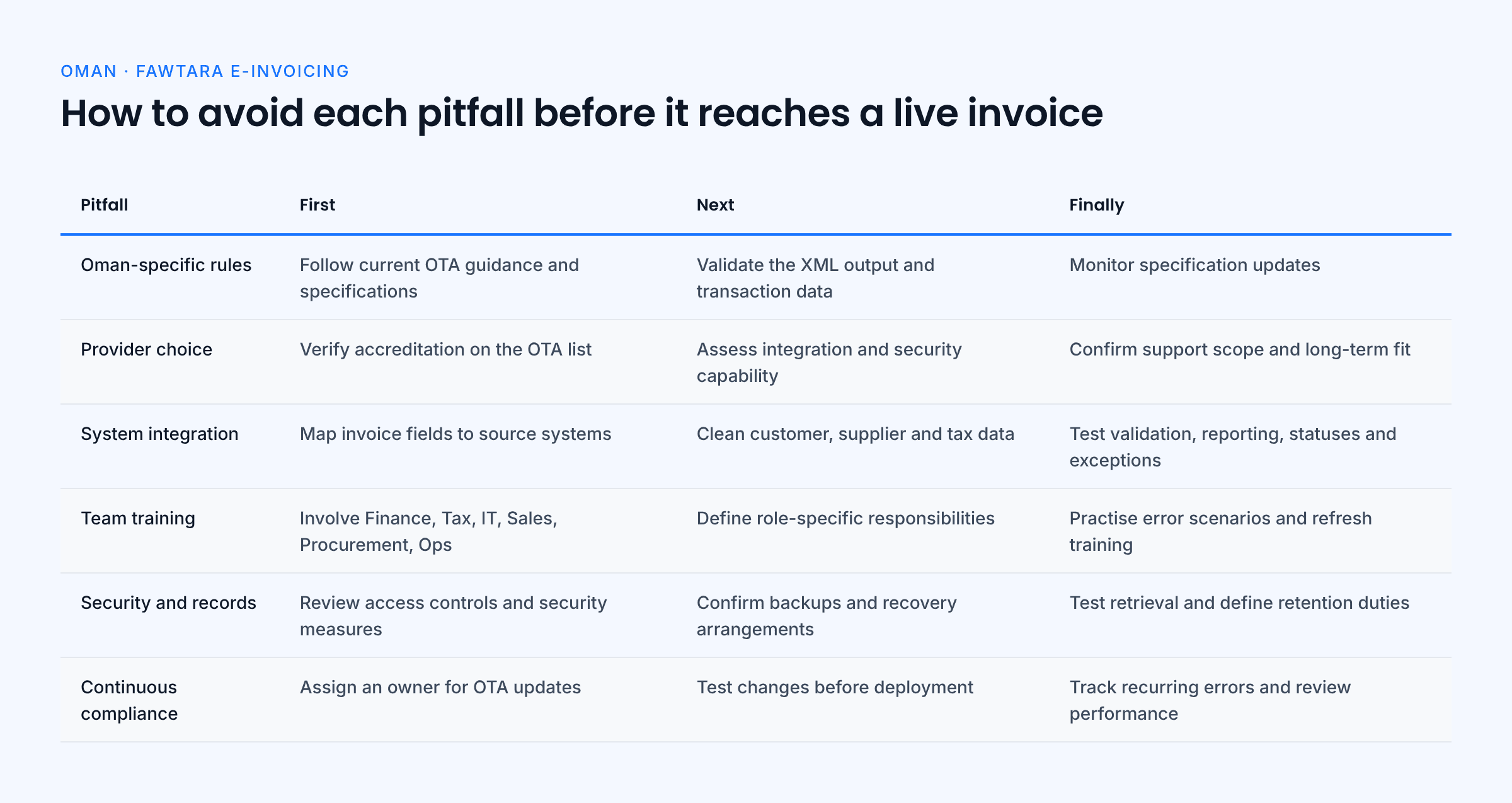
Master Oman’s Specific Compliance Requirements
The mistake: Assuming that an existing invoice template or a solution configured for another country will automatically meet Oman’s Fawtara requirements.
How to avoid it:
- Use official OTA guidance. Review the current taxpayer resources, manuals and applicable specifications rather than relying solely on a provider’s summary.
- Check the structured invoice. Confirm that the system generates the required XML output and that the data maps correctly to the applicable Oman rules.
- Review every relevant transaction type. Include the invoice and adjustment scenarios the business actually uses.
- Monitor changes. Confirm with the provider which specification version and validation rules are currently applicable.
Choose the Right Accredited Service Provider
The mistake: Selecting a provider based only on price, broad promises or a product demonstration.
How to avoid it:
- Verify accreditation. Check the OTA’s official provider list.
- Assess integration experience. Confirm that the provider can connect to the business’s ERP, billing, POS or accounting systems and explain the implementation approach.
- Review security and continuity. Ask about MFA, encryption, monitoring, backups, incident response and data retrieval.
- Confirm service scope. Agree on testing, onboarding, support, escalation, updates and transaction scenarios before signing.
- Evaluate long-term suitability. Make sure the solution can support the business’s operational needs as volumes and processes change.
Prioritise End-to-End System Integration
The mistake: Treating e-invoicing as a standalone application instead of a process connected to source systems, finance operations and exception handling.
How to avoid it:
- Map required invoice fields to the systems that supply them.
- Correct incomplete or inconsistent customer, supplier and tax data.
- Test structured invoice generation, validation, reporting or exchange, status updates and exception handling.
- Include self-billing and reverse-charge workflows where applicable.
- Document technical ownership and escalation paths for integration issues.
Implement a Cross-Functional Training Programme
The mistake: Launching the system without making sure employees know their responsibilities and how to handle common issues.
How to avoid it:
- Bring Finance, Tax, IT, Sales, Procurement and Operations into implementation planning.
- Train Finance on issuance, adjustments, reconciliation and invoice status handling.
- Train Tax on applicable rules, special scenarios and correction approvals.
- Train IT on mapping, monitoring, access controls and technical escalation.
- Use realistic examples and repeat training when requirements or processes change.
Enforce Strong Data Protection and Record Keeping
The mistake: Assuming that provider accreditation alone covers every internal security and archiving responsibility.
How to avoid it:
- Review user permissions and administrative access.
- Confirm encryption, monitoring, backup, incident-response and recovery arrangements with the provider.
- Test that invoice records and related correction documents can be retrieved.
- Define retention responsibilities under applicable VAT rules.
- Keep a documented process for security incidents and record-access requests.
Establish a Process for Continuous Compliance
The mistake: Treating implementation as complete once the first invoices are processed successfully.
How to avoid it:
- Assign responsibility for monitoring OTA updates and provider communications.
- Test relevant changes before applying them to live workflows.
- Track recurring errors and corrective actions.
- Maintain a service-interruption and recovery process.
- Schedule periodic reviews and role-specific refresher training.
Oman E-Invoicing Readiness Checklist
Use this checklist in implementation meetings and assign an owner to each item.
- Regulatory requirements: Confirm the current OTA guidance and applicable technical specifications.
- Structured invoice output: Verify that the system generates the required XML invoice, not only a PDF.
- Data quality: Check buyer and seller details, tax information, invoice references and source-system mappings.
- Provider accreditation: Verify the provider on the OTA’s official list and document the agreed service scope.
- Integration testing: Test invoice creation, validation, exchange or reporting, status handling and exceptions.
- Transaction coverage: Include applicable imports, self-billing, reverse-charge transactions and adjustment documents.
- Security controls: Review access, MFA, encryption, monitoring, backups and incident response.
- Record keeping: Test invoice retrieval and document the business’s retention responsibilities.
- Team training: Confirm that Finance, Tax, IT and relevant operational teams have completed role-specific training.
- Ongoing ownership: Assign owners for OTA updates, provider escalation, recurring errors and post-go-live reviews.
Conclusion
Successful Oman e-invoicing implementation is about more than selecting a platform. Businesses need to understand the applicable Fawtara requirements, maintain accurate source data, test their integrations, train employees and protect invoice records.
The six pitfalls in this guide are manageable when teams address them early and assign clear responsibility. By building validation, exception handling, security and ongoing review into everyday operations, businesses can make the transition more controlled and keep their invoicing processes ready for change.
Official Sources
- Oman Tax Authority: Taxpayer resources
- Oman Tax Authority: Service Provider FAQ
- Oman Tax Authority: Service Provider Criteria
- Oman Tax Authority: E-Invoicing FAQ
- Oman Tax Authority: Fawtara manuals and user guides
- Oman Tax Authority: Accredited service providers
- OpenPeppol: Oman PINT specifications
This article provides general information and is not legal or tax advice. Fawtara guidance and technical requirements may change. Confirm the applicable requirements with current OTA publications and your tax adviser or accredited service provider.
Frequently Asked Questions
Common mistakes include assuming a PDF is sufficient, overlooking Oman-specific requirements, choosing a provider without verifying accreditation and capability, failing to validate data mapping, missing special transaction workflows, and neglecting training, security or ongoing updates.
No. The OTA identifies XML as the mandatory structured format. A human-readable copy may be used in applicable circumstances, but it does not replace the required structured e-invoice.
Verify the provider’s current accreditation on the OTA’s official list. Then assess its technical capabilities, integration approach, security controls, transaction coverage, support arrangements and update process.
The taxpayer remains responsible for compliance and the accuracy of its underlying transaction information. The accredited service provider validates and exchanges invoices and reports specified tax data to the OTA as part of its role.
Identify whether the issue comes from source data, field mapping, configuration or the transaction itself. Correct the underlying cause, follow the applicable correction procedure, and keep a record of the issue and its resolution. For tax-sensitive corrections, consult the current OTA guidance and the business’s Tax team.
No. Businesses should continue to monitor OTA updates, review validation errors, maintain records, train staff and test relevant changes. Ongoing ownership helps prevent small changes from creating repeated compliance issues.
About the Author

Swathy
Content Marketer
I’m a Content Marketer at Complyance, focused on e-invoicing. Over the years, I’ve created a wide range of content, including blog posts, whitepapers, and product guides, which have supported Complyance’s growth across markets such as the UAE and EU regions. My goal is to deliver content that is comprehensive, clear, accurate, and easy to understand, no matter how complex the topic.